







GP surgery websites
GP surgery website design, from first draft to go live.
We build one thing, for one kind of organisation. This is what that actually involves: how a surgery website gets designed, what it is measured against, and how we move you across without your patients noticing.
The brief
A surgery website has one job.
Get a patient to the thing they came for, quickly enough that they do not pick up the phone instead.
- 1 Book or cancel an appointmentFront and centre, first thing on the page. One tap to book, change or cancel.
- 2 Order a repeat prescriptionPrescriptions one tap from the homepage, never buried three menus deep.
- 3 Ask a question without waiting on holdA request form patients can actually find, instead of the 8am redial.
- 4 Check when you are openHours, holiday changes and alerts your team can update in seconds.
- 5 Work out what to do when you are closedClear out-of-hours signposting for the patient visiting at midnight.
Every errand that fails becomes a phone call, at 8am, to your reception team.
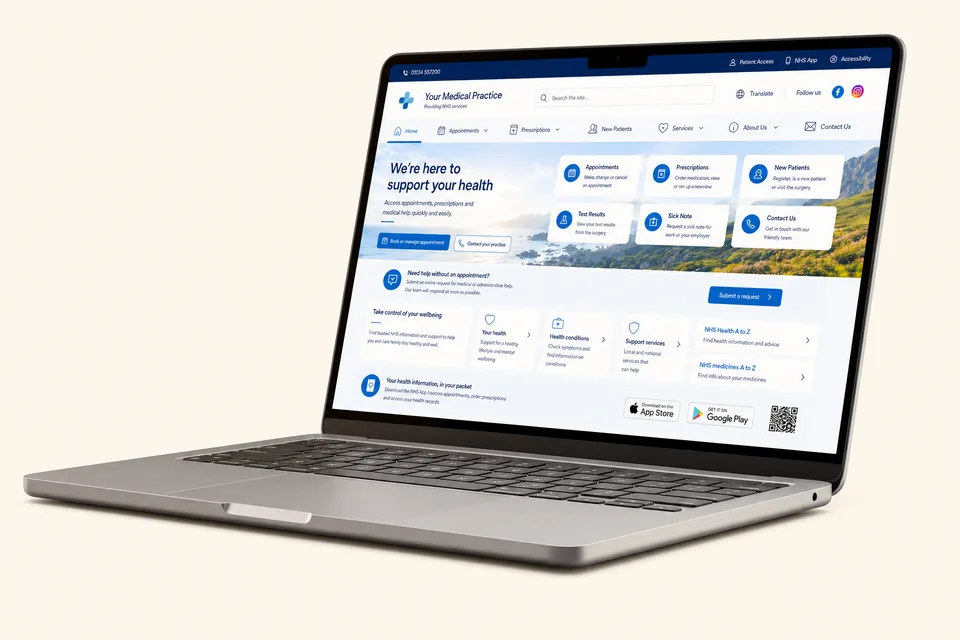
So we design around the tasks, not around a template. Even the words matter: the average UK adult reads comfortably at the reading age of an eleven-year-old, so we write for plain English rather than reproducing whatever the old site said.
The build
How a GP surgery website gets designed and built.
Six stages, and an honest note on each about what we need from you. Practice time is the scarcest thing in this process, so we have automated as much of it as we can: we do almost all of the work, and your current website carries on untouched until the very last stage.
-
1
Book a call
We meet your team, demonstrate the system, show you live surgery websites and answer every question you have. No pressure and nothing to prepare. Your part: an hour, and your questions.
-
2
Agreement and quote
Your written quote is itemised for your practice, not pulled from a rate card. When you sign, your own site builder is allocated to your practice. Your part: read it, sign when you are ready.
-
3
The build 25 working days
Your site builder sends a short questionnaire covering the key decisions, then builds your first draft. Your current website carries on exactly as it is. Your part: One questionnaire. We do the rest.
-
4
Review 2 weeks
You review the first draft with your team and gather everyone's thoughts in one place. Nothing goes anywhere near patients yet. Your part: collect the feedback, in your own time.
-
5
Tweaks and changes as required
We make your revisions until you are completely happy, and the finished site is scored with our own audit engine against NHS England's benchmarking tool, WCAG 2.2, reading age, speed and security before launch. Your part: tell us what to change.
-
6
Migrate and go live zero downtime
We migrate your content, forms and the services patients rely on, and your domain points at the new site when you say go. We are watching while it happens. Your part: pick the day.
Timings are estimates. The build clock starts when your completed questionnaire comes back to us, and prompt answers keep everything on schedule.
And rather than take our word for the stages, you can read them measured on a real build: Brunswick Park Medical Practice, from first email to live website, told date by date from our project record.
Still weighing it up? We have written an honest guide to building a practice website yourselves and what to ask any provider before you sign, including us.
Measured, not asserted
There is an actual scorecard.
NHS England publishes a benchmarking and improvement tool for GP websites. Remarkably few providers mention it.
Website audit · Example Surgery
- GP benchmarking · 10 /33 · criteria scored well
- The online consultation form is a bare link at the top of the appointments page, with nothing explaining what it is for or when to use it instead of phoning. Give it a short labelled section: what the form does, when to use it, what happens next. That one change lifts it out of "inadequate".
- Reading age · 15.2 · average reading age · NHS target is 11 or under
- The pages patients use most read at secondary-school level, and the longest sentence on the site runs to 42 words. Rewrite the top patient pages in plain English: shorter sentences, everyday words, one idea per paragraph.
- Accessibility · 37 · confirmed WCAG failures across the site
- Text that fails contrast, forms that cannot be completed by keyboard, and images with no descriptions for screen readers. Fix the critical failures first, then publish an accessibility statement that reflects reality. This one is a legal duty.
- Performance · 52 /100 · page speed on a mid-range phone
- The homepage ships photographs at many times their displayed size, so it crawls on the phones most patients actually use. Resize and compress the images, and defer everything the first screen does not need.
- Link health · 4 /180 · links broken, of 180 checked
- Four dead ends, including one on the prescriptions page, exactly where a patient is trying to complete a task. Repair or remove all four, and redirect anything patients may have bookmarked over the years.
- Security · 58 /100 · security posture of the site and domain
- Several protective headers are missing and the TLS configuration is behind current guidance. Tighten the server configuration. None of it is visible to patients; all of it protects them.
- CQC readiness · 2 · checks to fix · England practices only
- The complaints wording does not state the practice-or-ICB route the guidance expects, and accessible formats are not offered anywhere. Correct the complaints route and say plainly how patients can get information in other formats and languages.
Illustrative example. Your report is built from your site’s real results, checked by a person.
The tool sets out what a good practice website looks like in specific, checkable terms: whether a patient can complete the top tasks without calling, whether the content is written at an accessible reading age, whether the essential information a practice is contractually required to publish is actually there and findable. We build against it rather than against taste, and our own audit engine scores every site against it before launch and periodically afterwards, because the standard moves and websites drift.
If you want the detail, we have written a plain-English guide to the benchmarking tool and what each part of it is really checking for.
You do not have to take our word for how your website scores. We will run this audit on it, whoever built it, and send you the report. Free, no obligation.
Get your free website auditAccessibility
A legal duty, not a feature.
Public sector websites in the UK have to be accessible. NHS GP practices are covered by that.
The Public Sector Bodies (Websites and Mobile Applications) (No. 2) Accessibility Regulations 2018 require an accessible website and a published accessibility statement. The standard referenced is WCAG at level AA. Version 2.2 is the current one, and it added criteria that catch a lot of older practice sites: we walked through exactly what changed in WCAG 2.2 and why practices should care. What it means in practice, built in from the first wireframe:
Contrast that survives daylight
Colour pairs tested to AA, so the text still reads on a bright screen at a bus stop.
Reflows at 200 percent zoom
Enlarge the text and the layout adapts. Nothing overlaps, nothing falls off the edge.
Works without a mouse
Every form and menu can be completed by keyboard alone, with the focus always visible.
Headings a screen reader can skim
Structured so a screen reader user jumps to what they need instead of listening to everything.
Never colour alone
Errors, statuses and links carry a word or a shape as well, for anyone who cannot see the red.
Checked annually, not once
An accessibility audit every year of the site's life, because the standard and the site both move.
Retrofitting that onto a finished site is expensive and never quite works. Designing with it from the start costs nothing extra, and it makes the site better for everyone holding a phone in one hand. We publish an accessibility statement for our own site as well as building one for yours.
Why now
The website is part of the front door.
Modern general practice access changed what a surgery website is for.
The modern general practice model asks patients to start more of their journeys online: online consultation, structured requests, care navigation. When that works, the 8am rush flattens out and requests arrive with enough information to be triaged properly. When the website is the weak link, patients revert to the phone and the practice absorbs the cost.
That is why we treat digital triage and the website as one system rather than two purchases. A structured request form that patients cannot find is not a triage tool, it is a page nobody visits. We have seen what makes SmartForms actually get used: the signposting, the wording and the position on the page decide it.
It is also why we build analytics into the website rather than bolting them on. Knowing which pages patients actually use, and where they give up, is the difference between improving a website and redecorating it.
Monday, 8am
Where the demand lands
Every failed online journey joins the queue.
Requests arrive structured, triaged and calm.
Illustrative. PatientInsights shows you your practice’s real pattern.
Switching provider
Nobody has to notice.
The fear is always the same: a gap where the website used to be, on a Monday morning.
It does not work like that. Your current website stays exactly where it is while we build the new one. Content comes across, your team reviews it, and only when you are happy does the domain point somewhere new. The switch itself is planned for zero downtime and we watch it happen rather than scheduling it and hoping.
The one part that needs care is the domain, especially where your current provider administers it on your behalf. We tell you what to ask them for, in writing, and when. Practices leaving a provider that is closing down have a harder version of this problem, and if that is you because of the My Surgery Website wind-down, there is a page with the dates and the mechanics on it.
Not decided yet? Start with the free audit of your current website. It shows where you stand today, whoever built it, and it costs you nothing to find out.
We also move PCNs and federations, where several practices share a design and a content spine but keep their own identity and their own pages. That is group central management, and it is a different job from doing the same migration eight times. We wrote about what running multiple practice websites well actually takes if that is your world.
Your move
Managed by us, end to end
- ✓ Content and imagery moved across for you
- ✓ New site built and reviewed with your team
- ✓ Domain switched at go-live, handled by us
- Patients see the new site, seamlessly
Most practices are live within a few weeks of saying go.
What it runs on
The part nobody asks about until it matters.
Most websites for GP surgeries in the UK are built on WordPress with a theme and a stack of plugins. It is a reasonable choice for a lot of the internet. It is a harder one for a website that carries patient-facing health information and sits inside NHS supplier assurance.
Patchstack recorded 11,334 new vulnerabilities in the WordPress ecosystem during 2025, and nine in ten of them were in plugins rather than the core. Every plugin is somebody else's code, patched on somebody else's timetable.
We have never used WordPress. Every site we have built since 2009 runs on our own platform and CMS, with no third-party plugins, no public themes and no publicly documented admin path. That is not a claim that we are unhackable. It is a claim that an entire category of vulnerability does not apply to us, and the numbers above are the size of that category.
A typical WordPress stack
Inherited risk
Our platform and CMS
Fully controlled
One codebase.
Ours.
- ✓ First built in 2009, rebuilt generation after generation since
- ✓ No third-party plugins, no shared or public themes
- ✓ No publicly documented admin path
- ✓ UK infrastructure, Cyber Essentials certified
The full argument, with the figures, and how we handle security, hosting and certification. Vulnerability figures: Patchstack, State of WordPress Security 2026.
Questions
The things practices ask us.
How long does a GP surgery website take to build?
Your first draft is typically built within 25 working days of your questionnaire answers coming back, you review it with your team over a couple of weeks, and we make changes until you are happy. The switch itself waits for you: your current website stays live until the moment the new one takes over.
Can we keep our existing domain, including a .nhs.uk address?
Yes. Your domain is your practice's front door, printed on prescriptions and saved in patients' bookmarks, so it moves with you. We handle the transfer and the DNS, and we plan the switchover for zero downtime. If your current provider administers the domain, we tell you exactly what to ask them for and when.
Will the website work with EMIS, SystmOne and the NHS App?
Yes. We integrate cleanly with the clinical systems, patient apps and NHS tools your practice already depends on: EMIS Web, SystmOne, Vision, the NHS App, Patient Access, AccuRx, eConsult and more. The website's job is to put each of those front doors exactly where patients look for them.
Can our own staff edit the website, or do we have to ask you?
Both, whichever suits the week you are having. Your team edits pages, opening times, news and staff details through our own CMS with no technical knowledge needed. When it is easier to hand it over, email your support address and our team makes the change. Content updates are included in support, not billed by the hour.
What does a GP surgery website cost?
We quote per practice rather than publishing a price, because a single-site surgery and an eight-practice PCN are not the same job. Our model is a one-off build followed by an annual support plan, which is different from the all-in annual licence some providers sell, so we would rather put the real numbers in writing than post a headline figure that does not compare like for like. Ask us and you get an itemised quote with no obligation.
How is this measured against NHS requirements?
Against NHS England's GP website benchmarking and improvement tool, the NHS service manual and content guide, and WCAG 2.2 at level AA. We run those checks with our own audit engine before launch and again through the life of the site, because guidance changes and a website that met the standard in 2024 may not meet it now.
Do you use WordPress?
No, and we never have. Every website we have built since 2009 runs on our own platform and CMS. Patchstack recorded 11,334 new vulnerabilities in the WordPress ecosystem during 2025, nine in ten of them in plugins. None of them apply to a website with no plugin ecosystem.
What happens if our current provider is closing down?
We move practices between GP surgery website providers regularly and the process is the same whether you are leaving by choice or because the decision was made for you. Content comes across, the new site is built and reviewed with your team, and the domain switches when you say so. If you are with My Surgery Website, there is a page written specifically for that wind-down.
Reviews
Trusted by NHS GP practices.
Five stars from the practice managers and partners we work alongside every day.
“We’ve had a fantastic experience with Tree View Designs…”
“They are incredibly efficient, responsive and quick to get things done…”
“Very knowledgable and helpful in building our new website. Responsive service. Would recommend.”
Get in touch
Start with the audit, or start with a conversation.
We have handled GP surgery website design, development and support since 2009, for more than 1,000 medical practices across the UK. Tell us about yours and we will be straight with you about what it needs, whether or not that turns into a quote.
Want to see one first? Visit a live surgery website we built.